LaTex 系列 - 3. LaTex 项目文件包含问题
在 LaTeX 复杂项目中,出现文件包含情况,例如 main.tex 文档包含多个章节,我们可以不同章节设置单独 tex 文档 (例如 chap_1.tex),那么在 main.tex 文档中使用如下命令进行文件包含:
1 | |
然后每次修改 chap_1.tex 文档,都需要重新编译 main.tex 文档,这样会比较麻烦。
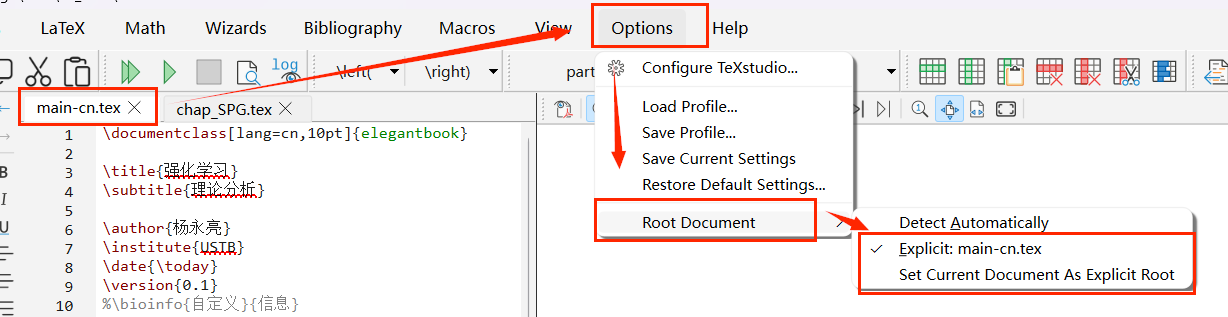
为了解决这个问题,我们可以通过以下设置,简化操作 (即修改 chap_1.tex 后,点击编译按钮,实现编译 main.tex):
- 确保当前打开的文件是 main.tex
Options->Root Document- 然后选择以下两个选项均可(可能只会有第二个选项)
Explicit: main.texSet Current Document As Explicit Root做好上面设置后,main.tex就被设置为项目的根文件,每次修改chap_1.tex后,点击编译按钮,就会自动编译main.tex文档。
LaTex 系列 - 3. LaTex 项目文件包含问题
http://yylustb.github.io/2025/02/03/code/Latex/latex_3-input-2025-02-03/