1
2
3
4
5
6
7
8
9
10
11
12
13
14
15
16
17
18
19
20
21
22
23
24
25
26
27
28
29
30
31
32
33
34
35
36
37
38
39
40
41
42
43
44
45
46
47
48
49
50
51
52
53
54
55
56
57
58
59
60
61
62
63
64
65
66
67
68
69
70
71
72
73
74
75
76
77
78
79
80
81
82
83
84
85
86
87
88
89
90
91
92
93
94
95
96
97
98
99
100
101
102
103
104
105
106
107
108
109
110
111
112
113
114
115
116
117
118
119
120
121
122
123
124
125
126
127
128
129
130
131
132
133
134
135
136
137
138
139
140
141
142
143
144
145
146
147
148
149
150
151
152
153
154
155
156
157
158
159
160
161
162
163
164
165
166
167
168
169
170
171
172
173
174
175
176
177
178
179
180
181
182
183
184
185
186
187
188
189
190
191
192
193
194
195
196
197
198
199
200
201
202
203
204
205
206
207
208
209
210
211
212
213
214
215
216
217
218
219
220
221
222
223
224
225
226
227
228
229
230
231
232
233
234
235
236
237
238
239
240
241
242
243
244
245
246
247
248
249
250
251
252
253
254
255
256
257
258
259
260
261
262
263
264
265
266
267
268
269
270
271
272
273
274
275
276
277
278
279
280
281
282
283
284
285
286
287
288
289
290
291
292
293
294
295
296
297
298
299
300
301
302
303
304
305
306
307
308
309
310
311
312
313
314
315
316
317
318
319
320
321
322
| \usetikzlibrary{arrows.meta,positioning,calc,fit}
%\usepackage{mathptmx} % Times New Roman 字体
\begin{tikzpicture}[
% 开始TikZ绘图环境,方括号内定义全局样式
>=Stealth,
% 设置默认箭头样式为Stealth(三角形箭头)
thick,
% 设置所有线条为粗线
% 定义各种节点样式
block/.style={
% 定义名为"block"的样式,用于绘制方框(如P、I、D、System)
draw,
% 绘制边框
rectangle,
% 形状为矩形
minimum height=1cm,
% 最小高度1厘米
minimum width=2cm,
% 最小宽度2厘米
align=center,
% 文本居中对齐
line width=0.8pt
% 边框线宽0.8pt
},
sum/.style={
% 定义名为"sum"的样式,用于绘制求和器(圆圈)
draw,
% 绘制边框
circle,
% 形状为圆形
inner sep=0pt,
% 内部间距为0(文字紧贴边框)
minimum size=8mm,
% 圆的最小直径8毫米
line width=0.8pt
% 边框线宽0.8pt
},
dashedbox/.style={
% 定义名为"dashedbox"的样式,用于绘制虚线框
draw=cyan!60,
% 边框颜色为60%青色
dashed,
% 边框为虚线
line width=1pt,
% 虚线线宽1pt
rounded corners=3pt,
% 圆角半径3pt
inner sep=8pt
% 内部间距8pt(框与内容的距离)
},
label/.style={
% 定义名为"label"的样式,用于虚线框上方的标签文字
font=\small,
% 字体大小为small
cyan!70!blue
% 颜色为70%青色+30%蓝色的混合色
}
]
% 全局样式定义结束
% 主要节点定义
% 求和器1(比较器)
\node[sum] (sum1) at (0,0) {$\Sigma$};
% 创建第一个求和器节点:
% [sum]: 应用sum样式
% (sum1): 节点命名为sum1
% at (0,0): 位置在坐标原点
% {$\Sigma$}: 显示求和符号Σ
% 积分环节
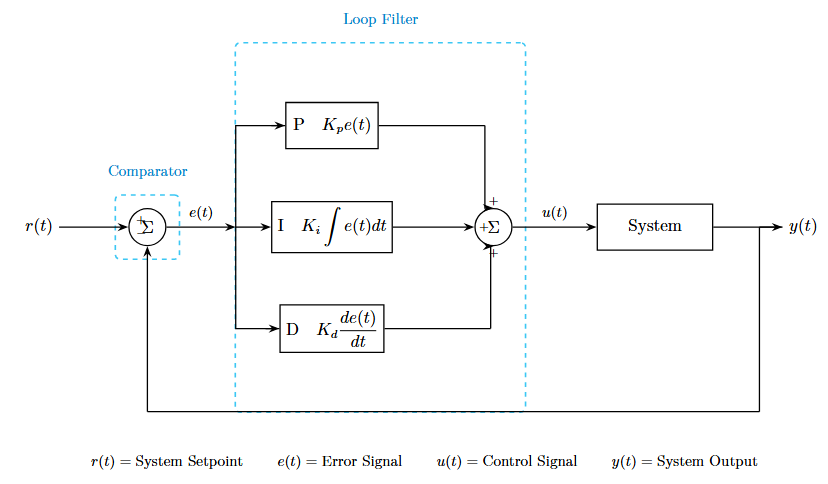
\node[block] (integral) at (4,0) {$\displaystyle\text{I}\quad K_i\int e(t)dt$};
% 创建积分环节节点:
% [block]: 应用block样式
% (integral): 命名为integral
% at (4,0): 位置在x=4, y=0
% \displaystyle: 使积分符号以显示模式(更大)显示
% \text{I}: 文本模式显示字母I
% \quad: 添加一个空格
% K_i\int e(t)dt: 积分公式
% 求和器2
\node[sum] (sum2) at (7.5,0) {$\Sigma$};
% 创建第二个求和器
% at (7.5,0): 位置在x=7.5, y=0
% 系统
\node[block, minimum width=2.5cm] (system) at (11,0) {System};
% 创建系统方框:
% minimum width=2.5cm: 覆盖默认宽度,设为2.5cm
% (system): 命名为system
% at (11,0): 位置在x=11, y=0
% 比例环节
\node[block, minimum width=2cm] (prop) at (4,2.2) {$\text{P}\quad K_p e(t)$};
% 创建比例环节(P控制器):
% at (4,2.2): 位置在x=4, y=2.2(上方)
% (prop): 命名为prop
% 微分环节
\node[block, minimum width=2cm] (diff) at (4,-2.2) {$\displaystyle\text{D}\quad K_d\frac{de(t)}{dt}$};
% 创建微分环节(D控制器):
% at (4,-2.2): 位置在x=4, y=-2.2(下方)
% (diff): 命名为diff
% \frac{de(t)}{dt}: 微分符号
% 输入输出节点
\node[left=1.5cm of sum1] (input) {$r(t)$};
% 创建输入节点:
% left=1.5cm of sum1: 在sum1节点左侧1.5cm处
% (input): 命名为input
% {$r(t)$}: 显示输入信号r(t)
\node[right=1.5cm of system] (output) {$y(t)$};
% 创建输出节点:
% right=1.5cm of system: 在system节点右侧1.5cm处
% (output): 命名为output
% 虚线框1:Comparator
\node[dashedbox, fit=(sum1), label distance=2mm] (comp-box) {};
% 创建比较器虚线框:
% [dashedbox]: 应用虚线框样式
% fit=(sum1): 自动调整大小以包围sum1节点
% label distance=2mm: 标签距离(未直接使用)
% (comp-box): 命名为comp-box
% {}: 节点内容为空(只显示边框)
\node[label, above=2mm of comp-box.north] {Comparator};
% 在虚线框上方创建"Comparator"文字标签:
% [label]: 应用label样式
% above=2mm of comp-box.north: 在comp-box的北侧(上方)上方2mm处
% 虚线框2:Loop Filter
\coordinate (filter-nw) at ([xshift=-8mm, yshift=10mm]prop.north west);
% 定义Loop Filter虚线框的西北角坐标:
% \coordinate: 定义一个坐标点(不可见)
% (filter-nw): 命名为filter-nw(northwest)
% [xshift=-8mm, yshift=10mm]: 相对于prop.north west(比例环节左上角)
% 向左偏移8mm,向上偏移10mm
\coordinate (filter-se) at ([xshift=8mm, yshift=-10mm]diff.south east);
% 定义Loop Filter虚线框的东南角坐标:
% (filter-se): 命名为filter-se(southeast)
% 相对于diff.south east(微分环节右下角)
% 向右偏移8mm,向下偏移10mm
\node[dashedbox, fit={(filter-nw)(filter-se)(sum2)}] (filter-box) {};
% 创建Loop Filter虚线框:
% fit={(filter-nw)(filter-se)(sum2)}: 自动调整大小以包围这三个点/节点
% 这样就创建了一个包含P、I、D和sum2的大虚线框
\node[label, above=2mm of filter-box.north] {Loop Filter};
% 在虚线框上方创建"Loop Filter"文字标签
% 绘制连接线 - 全部横平竖直
% 输入到求和器1
\draw[->] (input) -- (sum1);
% 从input节点画箭头到sum1节点
% [->]: 表示线的末端有箭头
% --: 直线连接
% 求和器1后的分支点
\coordinate (branch1) at ([xshift=1.5cm]sum1.east);
% 定义一个分支点坐标:
% (branch1): 命名为branch1
% at ([xshift=1.5cm]sum1.east): 在sum1的东侧(右侧)向右1.5cm处
% 这个点用于信号分成三路(P、I、D)
% 求和器1到分支点,标注e(t)
\draw[->] (sum1.east) -- (branch1) node[pos=0.5, above, font=\small] {$e(t)$};
% 从sum1的右侧画箭头到分支点:
% node[pos=0.5, above, font=\small] {$e(t)$}: 在线段中点(pos=0.5)
% 上方添加文字标签e(t)
% 分支点到比例环节(先竖直后水平)
\draw (branch1) |- (prop.west);
% 从branch1到prop.west画线:
% |-: 先水平后竖直的连接方式(实际这里是先竖直后水平,因为目标在上方)
\draw[->] ([xshift=-0.3cm]prop.west) -- (prop.west);
% 在比例环节入口处画一小段箭头:
% [xshift=-0.3cm]prop.west: 从prop左侧向左0.3cm的位置
% 到prop.west: 箭头指向比例环节
% 这样做是为了让箭头出现在入口处而不是转角处
% 分支点到积分环节(水平直线)
\draw[->] (branch1) -- (integral.west);
% 从分支点直接画箭头到积分环节左侧
% 因为在同一水平线上,所以是直线
% 分支点到微分环节(先竖直后水平)
\draw (branch1) |- (diff.west);
% 从分支点到微分环节,先竖直下降再水平到达
\draw[->] ([xshift=-0.3cm]diff.west) -- (diff.west);
% 在微分环节入口处添加箭头
% 比例环节到求和器2(先水平后竖直)
\coordinate (prop-corner) at ([xshift=2.3cm]prop.east);
% 定义比例环节输出的转角点:
% (prop-corner): 命名为prop-corner
% at ([xshift=2.3cm]prop.east): 在prop右侧向右2.3cm处
\draw (prop.east) -- (prop-corner);
% 从比例环节右侧画线到转角点(水平线)
\draw[->] (prop-corner) |- (sum2.north);
% 从转角点画线到sum2的北侧(上方):
% |-: 先竖直后水平到达(这里是竖直下降)
% 箭头指向sum2的上方入口
% 积分环节到求和器2(水平直线)
\draw[->] (integral.east) -- (sum2.west);
% 从积分环节右侧直接画箭头到sum2左侧
% 在同一水平线上
% 微分环节到求和器2(先水平后竖直)
\coordinate (diff-corner) at ([xshift=2.3cm]diff.east);
% 定义微分环节输出的转角点
\draw (diff.east) -- (diff-corner);
% 从微分环节右侧画线到转角点(水平线)
\draw[->] (diff-corner) |- (sum2.south);
% 从转角点画线到sum2的南侧(下方)
% 竖直上升后到达sum2下方入口
% 求和器2到系统,标注u(t)
\draw[->] (sum2.east) -- (system.west) node[pos=0.5, above, font=\small] {$u(t)$};
% 从sum2右侧画箭头到system左侧
% 在中点上方标注u(t)
% 系统到输出
\draw[->] (system.east) -- (output);
% 从system右侧画箭头到output节点
% 反馈线 - 横平竖直
\coordinate (fb-right) at ([xshift=1cm]system.east);
% 定义反馈线的第一个转角点:
% (fb-right): 命名为fb-right
% at ([xshift=1cm]system.east): 在system右侧向右1cm处
\coordinate (fb-bottom) at (fb-right |- 0,-4);
% 定义反馈线底部的点:
% (fb-bottom): 命名为fb-bottom
% at (fb-right |- 0,-4): 使用垂直投影语法
% x坐标与fb-right相同,y坐标为-4
% 这样确保竖直下降
\coordinate (fb-left) at (sum1.south |- fb-bottom);
% 定义反馈线左侧的转角点:
% (fb-left): 命名为fb-left
% at (sum1.south |- fb-bottom):
% x坐标与sum1.south相同,y坐标与fb-bottom相同
% 这样确保水平线对齐
\draw (output) -- (fb-right);
% 从output画线到第一个转角点(水平线)
\draw (fb-right) -- (fb-bottom);
% 从第一个转角点画线到底部(竖直线)
\draw (fb-bottom) -- (fb-left);
% 从底部画线到左侧转角点(水平线)
\draw[->] (fb-left) -- (sum1.south);
% 从左侧转角点画箭头到sum1的南侧(下方)
% 竖直上升,箭头指向sum1
% 求和器的加减号
\node[font=\scriptsize] at ($(sum1.north west)+(0.15,-0.15)$) {$+$};
% 在sum1的西北角内侧位置添加加号:
% [font=\scriptsize]: 字体为scriptsize(很小)
% at ($(sum1.north west)+(0.15,-0.15)$): 使用calc库计算坐标
% $(...)$: calc语法
% sum1.north west: sum1的西北角(左上角)
% +(0.15,-0.15): 向右0.15,向下0.15
\node[font=\scriptsize] at ($(sum1.south west)+(0.15,0.15)$) {$-$};
% 在sum1的西南角内侧位置添加减号
% 向右0.15,向上0.15
\node[font=\scriptsize] at ($(sum2.north)+(0,0.15)$) {$+$};
% 在sum2的正上方内侧添加加号
% 向下0.15(进入圆内)
\node[font=\scriptsize] at ($(sum2.west)+(0.2,0)$) {$+$};
% 在sum2的正左侧内侧添加加号
% 向右0.2(进入圆内)
\node[font=\scriptsize] at ($(sum2.south)+(0,-0.15)$) {$+$};
% 在sum2的正下方内侧添加加号
% 向上0.15(进入圆内,用负值表示向下移动-0.15)
% 底部说明文字 - 居中显示
\coordinate (center) at (6,0);
% 定义图形的中心点坐标:
% (center): 命名为center
% at (6,0): 大致在整个图形的水平中央
\node[below=4.8cm of center, font=\small] (labels) {
% 创建说明文字节点:
% below=4.8cm of center: 在center点下方4.8cm处
% [font=\small]: 字体大小为small
% (labels): 命名为labels
$r(t) = \text{System Setpoint}$ \qquad
% 第一项说明
% \qquad: 添加较大的水平间距
$e(t) = \text{Error Signal}$ \qquad
% 第二项说明
$u(t) = \text{Control Signal}$ \qquad
% 第三项说明
$y(t) = \text{System Output}$
% 第四项说明
};
% 所有说明文字在一个节点中,自动居中对齐
\end{tikzpicture}
|